How to make a Christmas card from your photo
Published
To make a Christmas card from your photo, open the Christmas category, run the Christmas card effect on a selfie, type your greeting in the meme editor and save the file. A portrait comes out at 768 by 1024 pixels. That suits a chat and a small print.
Pick an effect that works as a card
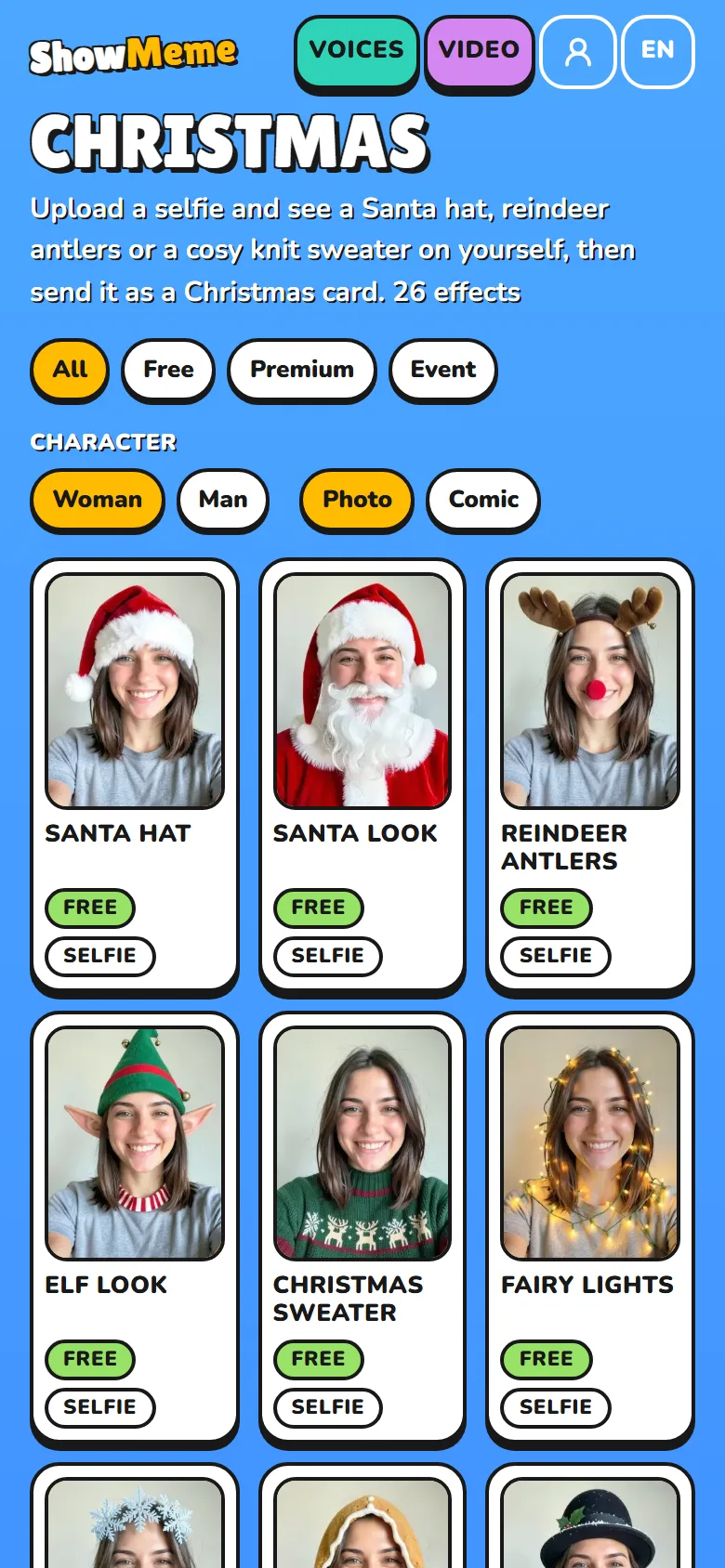
The Christmas category mixes free and priced effects, and each effect page shows its price before you start. These six carry a card on their own:
| Effect | What you get | Photo |
|---|---|---|
| Christmas card | Your portrait in a fir wreath with lights on deep red | Selfie or full body |
| Santa hat | A red hat with a white fur brim and a pom-pom. Your face and background stay | Selfie or full body |
| Christmas sweater | A chunky knit sweater with reindeer and snowflakes | Selfie or full body |
| Tree room | A new background: a living room with a tree, gifts and a fireplace | Selfie or full body |
| Gift box | You pop up behind a huge gift box with a red ribbon | Full body only |
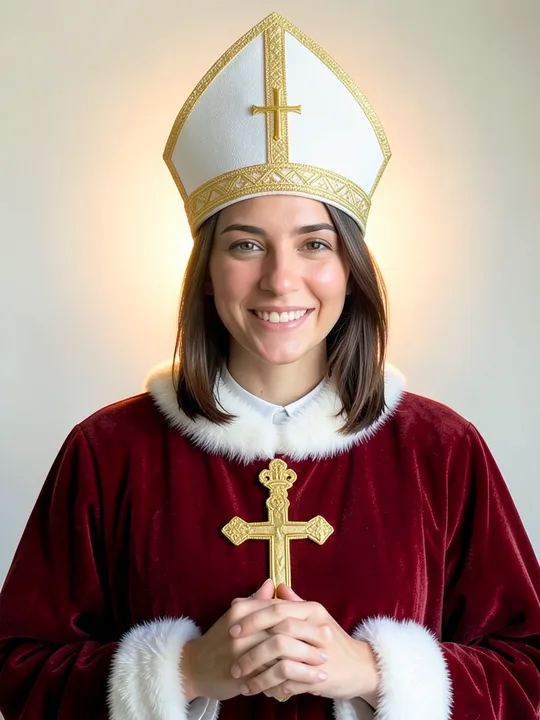
| Saint Nicholas | A mitre and a red cope with white trim and a gold cross | Selfie or full body |
A priced effect takes coins only once the result is ready, and you get them back if it fails. For a first try, run Santa hat, then the Christmas card.
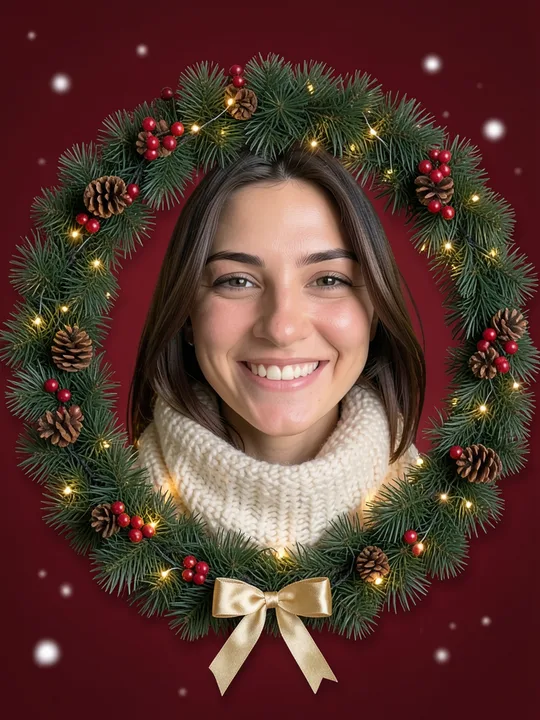
Here is the Christmas card effect on the site's example selfie:

The effect draws the wreath, the lights and the red background, and wraps you in a cream knit scarf. It frames you from the shoulders up, so give it a selfie.
You can stack effects: under the result, tap "One more effect" and add Tree room on top of Christmas sweater. Each step counts as one effect.
Make the picture
- Open the effect page and tap "Try it on your photo".
- Choose Selfie (face and shoulders) or Full body, then take a photo or pick one from your gallery.
- Pick a mode. Natural keeps the photo a photo. Comic turns it into a drawing with bold lines and flat colours.
- Tap "To the studio" and confirm the short notice about how the site handles your photo.
- The studio makes the effect. A free user may see an ad first, and a priced effect asks you to unlock it with coins.
Use a photo of yourself or of someone who agreed to be edited. The site sends it out only while the effect is made and deletes that copy right after.
Write the greeting in the meme editor
Under the finished picture, tap "Make a meme". The editor draws the text on your device, so your words stay with you. The meme generator page shows a finished example.
- Two fields, Top and Bottom, take up to 80 characters each.
- The text comes out in capitals, white with a dark outline, centred.
- You pick the size: S, M or L. A long line wraps onto up to three lines, then the letters shrink.
- On the free plan the bottom line sits just above the small showmeme.app mark.
Put the wish on top and your names at the bottom. In the wreath example the fir branches reach almost to the top edge, so both lines land on the wreath. Size S covers the least of it. Check the preview, then tap Done. The captioned picture exists only in the open page, so save it before you reload.
Save it and send it
The result screen has two buttons, Save and Share. Save downloads the file: a captioned picture as a JPG, a picture without a caption as a WebP. Share passes the file to your phone's share menu, so the card arrives in the chat as a picture with your greeting on it.
The sheet also has Copy link and social shortcuts. These send a link to the result page, which shows the picture without your caption and stops working after 48 hours, when the server deletes the result.
Send the file, not the link. Your greeting exists only in the file you saved.
"Add to the Top list" publishes the picture on the public Top list, so skip it when the card is for family only.
A card for 6 December
Saint Nicholas Day falls on 6 December in Western Christian countries. In the Netherlands the celebration is on its eve, 5 December. The Saint Nicholas effect dresses you as the bishop, with your hands folded in front of the chest.
Print it small
768 by 1024 pixels is a small file for printing. The print lab dotPhoto rates 300 pixels per inch as best, 200 as good and 150 as borderline (read on 15 November 2026). For this file:
| Print size | Pixels per inch | Rating |
|---|---|---|
| 6.5 × 8.7 cm | 300 | Best |
| 9.8 × 13 cm | 200 | Good |
| 13 × 17.3 cm | 150 | Borderline |
| A4, 21 cm wide | 93 | Below the chart |
Standard 10 × 15 cm photo paper has a 2:3 shape and the picture is 3:4. Printed whole, it covers 10 × 13.3 cm at about 195 pixels per inch and leaves white strips on the paper. Printed to fill the paper, it loses the left and right edges, where the wreath is. On the free plan the small showmeme.app mark prints with the rest.
What it cannot do
- It makes one picture. There is no inside page, no fold and no back.
- The caption has one look. You cannot move it, recolour it or change the font.
- It does not print or post anything. You get a file and do the rest yourself.
- It does not promise an exact result. The studio warns you that the result may surprise you, and a second try counts as a new effect.
- It does not keep the card for you. The server deletes the result after 48 hours, so the file you saved is the only copy.
Where the facts come from
- https://en.wikipedia.org/wiki/Saint_Nicholas_Day (read 15 Nov 2026)
- https://www.dotphoto.com/article/91319-what-is-the-best-resolution-for-my-photos-wall-art-and-posters (read 15 Nov 2026)