How to tell a picture or a song was made by AI
Published
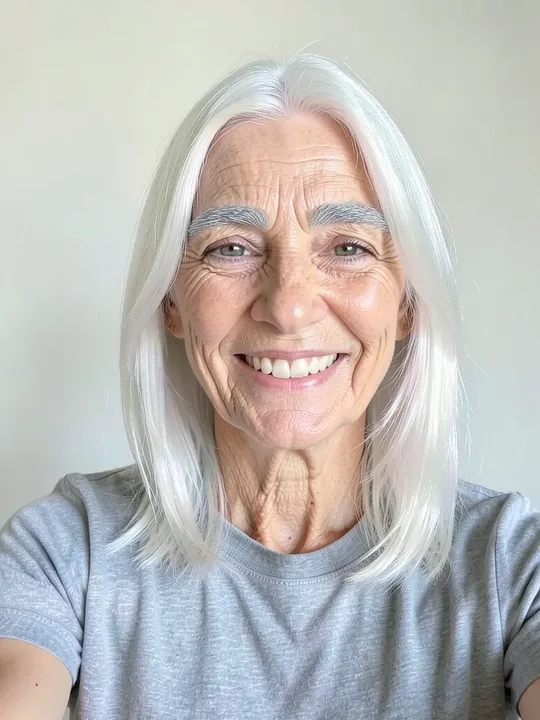
You often can't tell by looking. Here is the example selfie from our catalogue and two results made from it.

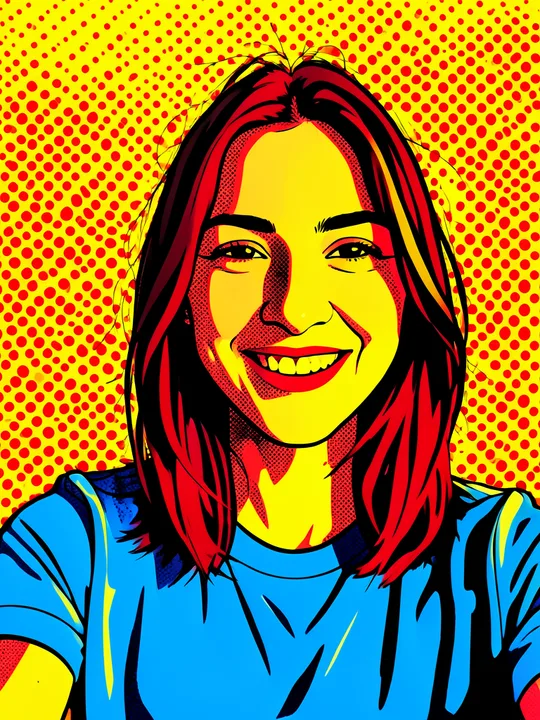
The Pop art portrait gives itself away with its dots and outlines. The +50 years one has nothing like that. Our catalogue promises a result "like a real photo of a grandparent", and a quick look will not tell you that a model drew the wrinkles. So check two more things: a mark you can see, and a label saved inside the file.
These three pictures are examples from our effect catalogue and carry no corner badge. A result you make yourself gets the marks described below.
Start with the mark you can see
A picture you make on ShowMeme has a small badge in the bottom-right corner. It shows the Shomi mark, which is a yellow smiling face, and the address showmeme.app on a translucent white pill. We draw the badge into the picture, so the file you download has it too.
Three cases differ:
- Results of Premium accounts have no badge. When you share one, say it is AI-generated yourself.
- The before and after GIF always has the badge, on Premium too.
- A meme published on the Top list always has it, because our server draws that copy.
Sound has no corner to stamp. For a voice or a song, the mark is the words "Made with AI" next to the player: in the studio, on the share page and on the page of every Top list publication. That label belongs to the page. Download the MP3, send it to a friend, and the label stays behind.
Read the label inside the file
A file carries text about itself next to the pixels or the sound. That text is called metadata. EXIF and XMP are two standard places for it in a picture, and ID3 tags do the same job in an MP3. We write the AI label there for every result, Premium included.
| Result | What we write into the file |
|---|---|
| Picture (WebP) | EXIF: the description "Edited with generative AI by ShowMeme (showmeme.app)." and the software name "ShowMeme (showmeme.app)". XMP: the same two, plus the IPTC Digital Source Type "trainedAlgorithmicMedia". |
| Meme from the meme generator (JPEG) | The same EXIF and XMP fields as a picture. |
| Voice or song (MP3) | ID3 tags: "ai_generated" with the value "true", "generator" with the value "ShowMeme", and the comment "Made with AI". A song also gets a title, such as "Pop song from your voice". |
The Digital Source Type comes from a public list kept by IPTC, the International Press Telecommunications Council. On that list our value has the name "Created using Generative AI". The list has a separate value for a picture taken with a digital camera, so software that reads the field can tell the two apart.
Open the label on a phone or a computer
The steps depend on the device:
- Windows: right-click the file, choose Properties and open the Details tab. In our check on Windows 11 on 15 November 2026, a picture with our label showed the description under Title and "ShowMeme (showmeme.app)" under Program name.
- Mac: open the picture in Preview and click the Info button in the toolbar. The Inspector window opens, and its More Info pane lists what Preview can read.
- iPhone: open the picture in Photos, then swipe up or tap the Info button.
- Android with Google Photos: open the picture, tap More, then About, and scroll to "How this was made". Google's help page says this section relies on IPTC metadata and that not all images have it.
Built-in viewers show a few fields each, and which ones depends on the app. In the same Windows check, the Details tab of an MP3 with our tags showed the song title and none of the three AI tags. Treat an empty panel as a limit of the app.
A metadata reader shows the rest. ExifTool is a free one for Windows and Mac that reads EXIF, XMP and ID3. Open a terminal, type exiftool, a space and the name of the file, and it prints the fields it finds. The AI tags of an MP3 appear there as user-defined text.
Check the file you downloaded from ShowMeme. A copy that went through a chat app or a social network may have lost its metadata on upload.
Why we mark every result
The first reason is the law. Art. 50 of the EU AI Act (Regulation (EU) 2024/1689) applies from 2 August 2026. It requires providers of AI systems that generate images or audio to mark the output in a machine-readable way. We offer the image generator, the voice generator and the song generator under our own name, so we mark every picture, voice and song from the first result. Our AI Notice lists the models we use and what AI gets wrong.
The second reason is the person who gets your picture or your song. The +50 years selfie above can pass for a photo. Our Terms forbid removing the badge or the metadata. We also ask you not to present a result as an unedited photo, a real recording of a person or a real event.
What a mark cannot prove
- A missing mark does not prove that a camera took the picture. Cropping removes the badge, and some apps and social networks strip metadata on upload.
- A mark does not prove where a file came from. Metadata is text that an editor can add, change or delete. Our files are not signed yet. They have no content credentials (C2PA), no invisible watermark and no audio watermark.
- The label says that an AI model made or edited the file. It says nothing about what changed, who is in the picture or whether they agreed.
When it matters whether a picture is real, ask the sender for the original file and where it came from. When you share your own result, keep the badge and use the AI-generated label wherever a platform offers one.
Where the facts come from
- https://cv.iptc.org/newscodes/digitalsourcetype/ (read 2026-11-15)
- https://artificialintelligenceact.eu/article/50/ (art. 50(2) wording)
- https://exiftool.org/ (and https://exiftool.org/TagNames/ID3.html (read 2026-11-15)
- https://support.apple.com/guide/iphone/see-photo-and-video-information-iph0edb9c18f/ios (read 2026-11-15)
- https://support.apple.com/guide/preview/view-information-about-pdfs-and-images-prvw9c94f0a4/mac (read 2026-11-15)
- https://support.google.com/photos/answer/15532903 (read 2026-11-15)